The Minestones Assistant: ask in game or on the website, get step-by-step answers
Stuck? Type /assistant: the Minestones Assistant looks at your progress and tells you which button to press in which menu. How to use it in game and on the website.
"Where do I get stronger?", "How do I open a crate?", "What do I need to move to the next age?"… You can now ask these without waiting for anyone. The Minestones Assistant knows the game and its menus; if your account is linked to the game, it answers with your own numbers.
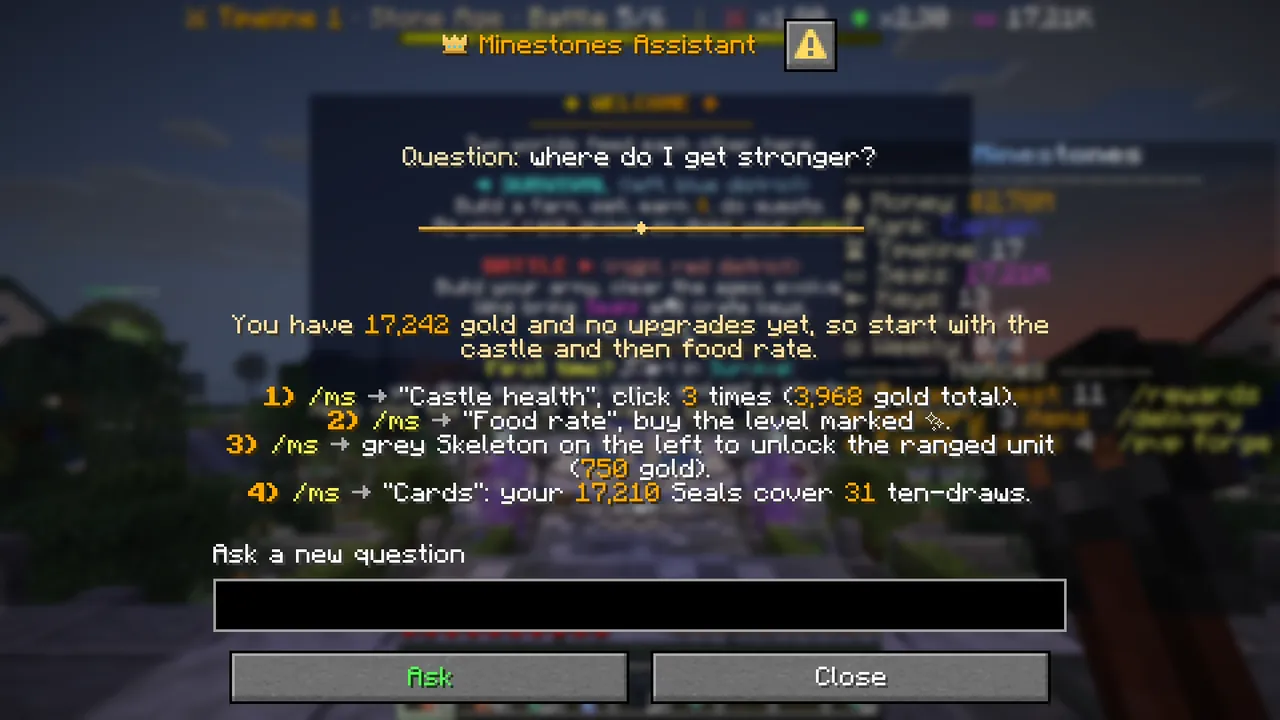 /assistant in game: the answer in a window, with the player's own numbers. A new question box at the bottom.
How to ask in game
- Type
/assistantand your question in chat:/assistant where do I get stronger? - Chat says the assistant is thinking, and the answer arrives in a few seconds.
- The answer opens in a window: your question at the top, the answer in the middle. Important numbers are gold, commands yellow.
- To ask something new, type in the "Ask a new question" box of the window and press "Ask".
If you closed the window, /assistant last opens the last answer again. Asking the same question again answers at once and does not use a
question from your limit.
On older clients (1.21.5 and below) the answer opens as a paged book instead of a window; turn pages with "Next ▶", and "✎ Ask a new question" on the last page opens chat.
What can you ask?
Anything about Minestones:
- Menus and buttons: "Where are the upgrades?", "How do I unlock a unit?", "How do I equip a potion?" The assistant gives the command and the button to click.
- Progress: "What do I need for the next age?", "Why do I keep losing?" With a linked account it looks at your age, gold, Seals and battle history.
- Survival: "How do I make money?", "How do I claim land?", "How do spawners work?"
- Store and account: what VIP gives, where a purchase arrives, how to link your website account.
The assistant only talks about Minestones; it does not answer questions about other games, homework or general chat. It cannot give, sell or change anything: it only shows the way.
How to ask on the website
Click the assistant bubble at the bottom right of minestones.net and type your question. The same assistant answers on the
website and in game. To get answers based on your own progress, link your website account to your game account: type /ms web in game and
enter the code on the website under My Account → Minecraft account.
How to ask a good question
- Say what you want to do: "how do I make my cards stronger" gets a better answer than "cards".
- Say where you are stuck: "I can't beat the Guard."
- If the answer is not enough, carry on in the same window: "and which potion should I take?"
To see the menus with screenshots: Wiki → Main Menu and the other wiki pages.