

Minecraft claim PvP guide: turn PvP on in your claim, avoid traps, keep your claim safe
On Minestones every claim has its own PvP switch. It is off by default; here is who can hit whom when it is on, the trap rule, what guards do and how to keep your claim safe.
On Minecraft survival servers claim protection is usually simple: nobody can hit you inside a claim. On Minestones we made it a little more flexible: every claim has its own PvP switch. Build an arena corner, a duel pit or a castle where intruders burn. This guide explains how it works and why nobody can set a trap with it.
How do I turn claim PvP on?
Type /claims and press Claim PvP. Every claim is a row; click its switch to turn PvP on or off.
- Off by default: every new claim starts with PvP off.
- Only the claim's owner can use the switch.
- A claim's switch waits a little between two changes.
The trap rule: nobody is hit without knowing
Turning PvP on and hitting someone inside right away does not work. The rule:
- Everyone inside when PvP goes on stays protected. Their protection ends only when they leave and come back in.
- A player entering a PvP claim sees "PvP claim" on screen and is protected for the first 3 seconds: they can neither hit nor be hit.
- So nobody can be hit without knowingly walking into a PvP claim.
What do guards do?
If you placed guards on your claim:
- With PvP off they only chase hostile mobs and never touch players.
- With PvP on they also attack players you do not trust; never the ones you trust.
How to place guards: see our Claim Guards post.
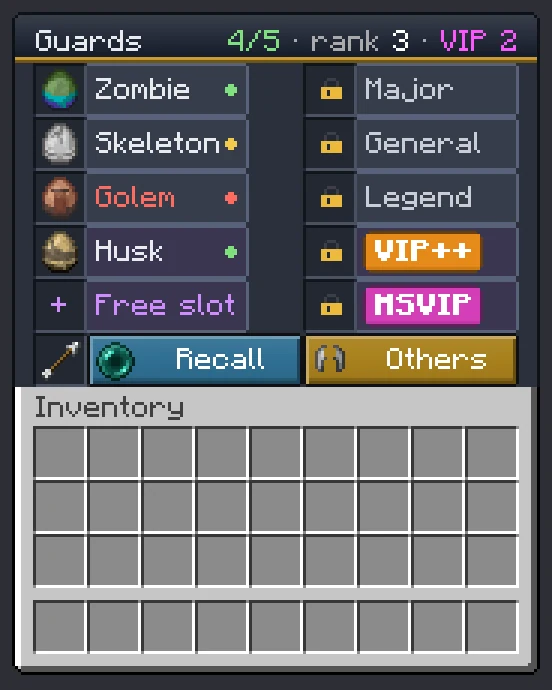 The Guards screen: your rank and VIP slots, one guard per row.
5 ways to keep your claim safe
- Trust carefully:
/claims trust <player>lets them build. Take the trust away and their guards in your claim go back to them. - Join now and then: the claim of a player away for 30 days drops (VIP 60 days).
- Teleport to your claim: in
/claims, left-click your claim to teleport; right-click to see its border. - Place guards: the easiest protection against mobs at night.
- Keep valuables in your claim: if you die in your claim, your items do not drop.
Try it now
/claims→ Claim PvP- Click your claim's row to turn PvP on.
- Walk out and back in with a friend and duel.
Server address: play.minestones.net. How to make a claim: our survival guide.
Written by the Minestones team. We build the game, the servers and this website. About us →