

The quest book: Minecraft daily and weekly quests at a glance
/quests got a new screen on Minestones. Every quest is one row: how much is left, whether it is ready to deliver and how many steps the chest is away. The Weekly Race is on the same screen.
The sentence we heard most from our testers: "I couldn't tell how far my quest was." They were right. The old quest screen hid everything in item tooltips. Not any more: with the quest book you see your Minecraft daily and weekly quests at a glance.
One row per quest
Type /quests. Every quest is a row: its picture on the left, its short name and progress bar in the middle, and on the right what to
do now:
- Deliver: your goods are ready, click to hand them in.
- ✔ Done: finished, the reward is yours.
- ⚔ 1/3: a quest that moves in battle; the sword tells you.
- 64/128: how much is left.
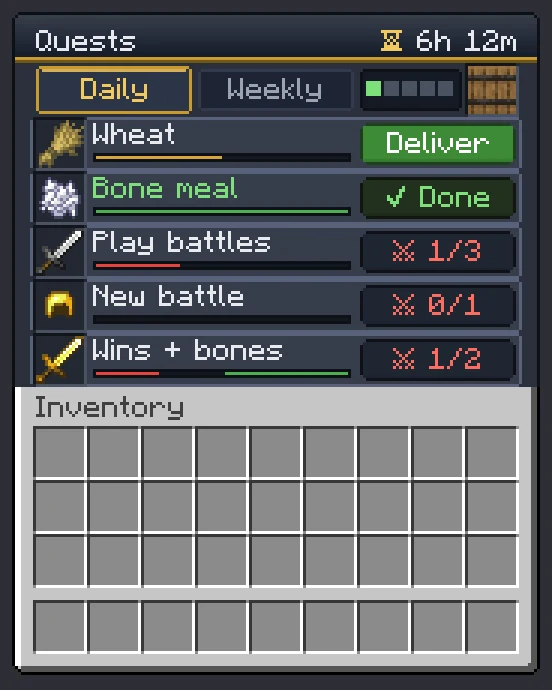 The daily tab: five quests, the tabs on top and the boxes towards the chest.
Two-part quests (like "wins + bones") split the bar: the red half is the battle part, the green half the survival part.
Tabs and the chest
On top are the Daily and Weekly tabs, with the time left in the corner. The boxes next to the tabs show how close the chest is: every finished quest turns one box green. Finish all daily quests and the chest is yours.
The Weekly Race on the same screen
Under the three weekly quests the weekly tab shows the Weekly Race card: this week's good, how much you delivered, your place and the next tier's reward. Click the card to deliver the good from your inventory.
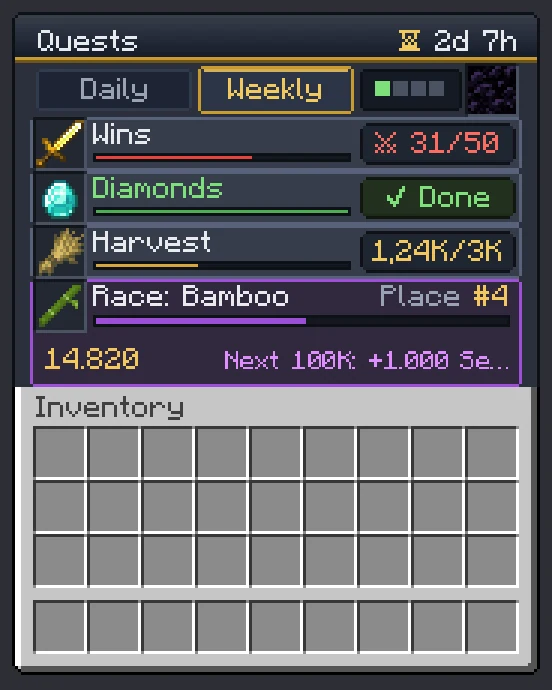 The weekly tab: three quests and the purple Weekly Race card.
New tooltips too
Hover a quest for the new tooltip: the goal, progress cells, the reward, the change price and one sentence on what to do. Don't like a quest? Right-click to change it; one change a day is free.
Try it now
/quests- Click Deliver on a quest that is ready.
- Right-click to change a quest.
Server address: play.minestones.net. More in our crates and quests guide.
Written by the Minestones team. We build the game, the servers and this website. About us →